Top Five Reasons to Buy!
Why It's $mart to Make Response Point Your Phone System
Whether you're looking for your first business phone system or want something easier to use and more powerful than your current system, Response Point has the features and benefits you need.
1. Voice-over Internet Protocol (VoIP) Benefits
Save up to 51%* on your phone bills when switching to VoIP!
Placing calls over the Internet improves business communications and cuts costs
- Response Point SP2 supports both VoIP and analog telephone lines in addition to digital lines, like T1, which are common for larger offices, providing phone service that suits your business’s changing needs.
- As your business grows, VoIP allows you to scale your phone system more quickly and cost-effectively than with traditional phone lines.
- VoIP lets remote or traveling employees maintain local phone numbers, reducing long-distance and 800-number costs and allowing you to enhance local visibility through listings in the chamber of commerce and local yellow pages.
- With lower long-distance rates and less reliance on outside support, your cost savings can really add up. Small businesses with 10 to 19 employees can save an average of $8,000 in the first year alone by purchasing an IP-based phone system such as Response Point*.
*(source: AMI-Partners June 2007)
2. Mobility
Stay connected with customers and colleagues — from almost
anywhere.
Response Point phone system software allows you to receive and place customer calls away from the office with ease. With employees freed from their desks—but still accessible—productivity is maximized.
- Call forwarding enables effortless mobility for employees on the go so callers can reach employees wherever they are.
View Screenshot » - Access and store contacts with ease using Microsoft Office Outlook business contacts
- Voicemail messages can be retrieved and archived effortlessly through e-mail, enabling Mobile users to receive instant notification and easily access any message—new or archived—while on the go.
View Screenshot » - An enhanced park/retrieve capability lets you handle calls from the ideal location within your office.
- Because setup and installation is so quick and simple, you can move to a new office location with minimal interruption in customer service.
- VPN access. Enable VPN access so that people can use the phone system from remote networks.
)
)
3. Caller Experience
Respond quickly and professionally to customers.
Response Point phone system software helps ensure VIP treatment for your callers. Incoming calls get answered faster, and customers can more easily reach the people they need. The result is improved customer satisfaction.
- The fully customizable Automated Receptionist smoothly routes calls to the right people and can answer common caller questions about your business, such as hours and location. Increased call volume is handled without compromising the customer experience.
View Screenshot » - Calls are transferred easily—between employees or departments—and unanswered parked calls get rerouted back to the receptionist so wait times are minimized.
- Screen pop-ups reveal details about callers, allowing more personalized service, and the Bypass Receptionist feature lets you specify which callers can ring employees directly.
View Screenshot » - Customizable URLs in notification windows. Integrate with 3rd-party applications to customize the links that appear inside incoming call notifications.
- The call history function empowers you to monitor and maximize responsiveness, customer service, and productivity. You can get complete details on each and every call, and export to Microsoft Office Excel® for analysis.
View Screenshot » - Click to call feature makes it even easier to find and connect with both internal and external contacts. To place a call, simply click the contact’s name.
)
)
)
4. Easy to Configure User Setup
Add new users quickly and easily.
Microsoft Response Point phone system software makes it easy to add and manage up to 50 users—without purchasing additional licenses. Average PC users can complete moves, additions, and changes without relying on expensive onsite support.
- Easy-to-follow configuration wizards let you add users in a few quick steps, so adjusting to staffing changes is simple.
View Screenshot » - Voicemail is set up automatically, and user names are instantly added to the company directory.
- Customizable After Hours Receptionist settings. Specify times when incoming calls should be routed during and after office hours, and holidays. Outside of these times, calls will be routed to the Automated Receptionist.
View Screenshot »
)
)
5. Response Point SP2 Features and Benefits
Microsoft Response Point Service Pack 2 (SP2) offers a rich suite of phone system features to connect you with your customers more effectively and at lower cost.
 |
 |
 |
Connect to Colleagues and Customers Quickly and Professionally
Increase productivity and savings
- Intercom & Paging
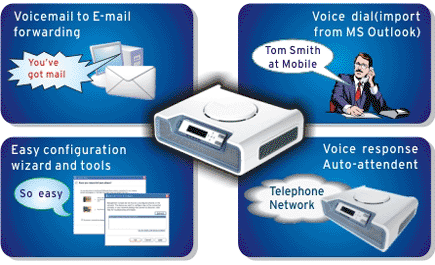
- Voice dial any of your Microsoft Office Outlook contacts just by speaking their name
- Connect callers to the right person using the Automated Receptionist
- Monitor call activity with call status and call history features
- Customers can call your employees directly using Direct Inward Dialing (DID) numbers
- Free directory assistance saves time and money
- Easy analog phone, digital line, VoIP adapter, and VPN support with new devices
- Launch a web page in response to an incoming call
- Upgrade firmware on phones and phone line adapters seamlessly with the upgrade wizard - automatically detects and provisions relevant devices
- Improved audio robustness
- Parked calls automatically return if left unattended
- Personal contacts can be called with specific services — for increased savings on long distance costs
End to End
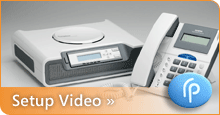
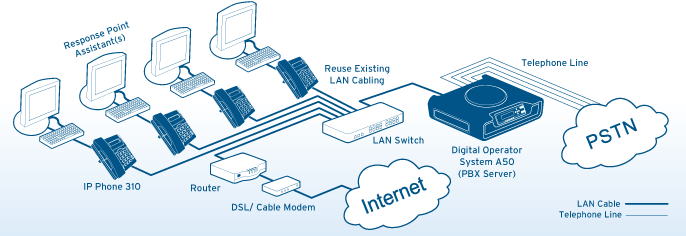
The Syspine Digital Operator A50 is an all-in-one IP telephony system that applies IP PBX methodology to drive standard telephone lines and optional security gateway (Internet connection, VPN, firewall…etc.). With the option to add up to 50 Syspine IP Phone 310 business phones, we can provide you with an end-to-end VoIP phone system that integrates all of your office communication needs.
Easy to Manage
With Syspine's user-friendly management console, it takes only a few minutes to set up a new phone, change preferences for voicemail or call handling, and create a call distribution list. The status of the system is displayed on the small screen of the Digital Operator A50 and helps your system administrator to easily figure out and solve problems.
Ultra-reliable Fanless Design
The Syspine Digital Operator A50 is high-end, server-grade design hardware with fanless housing. Featuring a frame with revolutionary high-quality lacquering, this highly reliable system not only caters to your communication needs, but also looks attractive, works extremely quietly and can be installed nearly anywhere in your office (flat on a desk, standing upright, mounted on a wall).
Easy to Install
Compared with existing IP PBX systems, the Syspine Digital Operator Phone System can easily be installed within minutes. Just follow the Microsoft configuration wizard's simple steps. No special IT / IP telephony knowledge or skills are required. You can successfully set up the system by yourself, just plug and dial!
- Easy to Use
With the Syspine small business phone system solution, you can get rid of the nightmare of confusing telephone key strokes and long programming manuals. Thanks to Syspine’s integrated solution of IP telephony and voice recognition, you just need to pick up your handset, press the Syspine IP phone Response Point button and say the recipient’s name to call. The system will retrieve the relevant phone number from the company directory or your Microsoft Outlook address book, and dial the recipient for you. Transferring, parking and retrieving calls have never been so easy!
Capabilities of the Digital Operator Phone System
| ‧ | Deployable in PSTN, VoIP or a hybrid environment |
| ‧ | Scales up to 50 employees (with no additional license fees) |
| ‧ | Call over VoIP lines |
| ‧ | Direct Inward Dialing (DID) numbers to better connect your employees and customers |
| ‧ | QoS (with Security Gateway option) |
| ‧ | Setup configuration wizards make changes easy |
| ‧ | Upgraded firmware on phones and phone line adapters is available for SP1. The upgrade wizard automatically detects and provisions relevant devices |
| ‧ | Call status and call history features for visibility of all call activity |
| ‧ | New, advanced call handling options for easy transferring, parking, and dialing |
| ‧ | Voice-dial access to free directory assistance |
| ‧ | Auto attendant provides fast, professional response 24/7 |
| ‧ | Voicemail to E-mail forwarding |
| ‧ | Microsoft Office Outlook contact integration |
| ‧ | PC screen pop-ups reveal new caller information with audible alerts |
| ‧ | Click to call (the ability to call any contact by clicking on his/her name in the Assistant software located on your computer) |
| ‧ | 64-bit compatibility |
Capabilities of IP Phone 310
| ‧ | Microsoft Response Point command button for voice activation of features |
| ‧ | Power Over Ethernet capability (extra hardware may be required) |
| ‧ | Call hold / Call transfer |
| ‧ | Audible call waiting indicator |
| ‧ | Speaker / Handset mute |
| ‧ | Redial |
| ‧ | 3 way conference |
| ‧ | Incoming call / Voicemail indicator |
| ‧ | Call waiting |
| ‧ | External and Internal Caller ID (Name & Number) display |
| ‧ | Call history (missed calls, received calls, and dialed numbers) |
| ‧ | PC Activated Features including: |
| - Do not disturb | |
| - Headset mode | |
| - Personal ring tone | |
| - Speed dial |
Product Application
PDF Brochure Small Business Communication made easy.